“Return management was the biggest pain point for us. Customers would call daily asking about their refunds and we had no clear visibility. After Shipra, every return is tracked end-to-end and our support tickets dropped by nearly 40% in six weeks.”
Returns were the part of the business I hated most. No visibility, customers calling to ask what happened, our team guessing. Since we moved to Shipra, the return rate has not changed but the chaos around it has. Everything is tracked and our team actually knows what is going on.
“Return management was the biggest pain point for us. Customers would call daily asking about their refunds and we had no clear visibility. After Shipra, every return is tracked end-to-end and our support tickets dropped by nearly 40% in six weeks.”
Five terms that come up all the time. AWB — Air Waybill, basically the tracking number a courier sticks on your shipment. NDR — Non-Delivery Report, this gets raised when a delivery attempt fails at the customer’s end. RTO — Return to Origin, what happens after repeated failed deliveries when the courier sends the package back to you. COD — Cash on Delivery, no explanation needed there. And manifesting — that’s when you batch up your packed orders and hand them over to the courier with a printed list. Know these and the dashboard starts making a lot more sense from day one.
Two photos per order, no exceptions. First one before you seal the box — product clearly visible, nothing obscured. Second one after sealing, with the shipping label fully readable in the frame. Why does this matter? Because when a customer says their order arrived damaged or an item was missing, your photo is the only thing standing between you and having to accept the claim. Blurry photos, photos with the label half-cut, photos taken in bad light — none of these will help you. Use natural light, take it right after packing, upload it to the order in Shipra before you move to the next one.
It’s a live summary of your day. Orders received, orders pending, orders in transit, orders delivered — all visible the second you log in. There are also quick links to create shipments, check your NDR list, and see COD remittance status. If something’s going wrong — a spike in NDRs, a delay with a courier — you’d catch it here before it turns into a bigger problem. It’s not a fancy dashboard full of graphs nobody looks at. It shows you the numbers you actually need.
A few ways. Inside your dashboard there’s a Help section — good for most standard queries. For anything urgent, call +91-9217082734 directly. Email is marketing@shipra.org and there’s also a contact form at shipra.org/contact if you prefer that. For time-sensitive issues — like an active shipment stuck somewhere — just call. Email and forms are fine for non-urgent things but calling gets you a faster response when something’s actually on the line. Support is on working days and most queries get picked up within a few hours.
It’s software that sits between your store and your couriers so orders get processed without your team doing each step by hand. Here’s what manual looks like — someone downloads the order list, copies each order into a courier portal, waits for a label, prints it, writes the tracking number somewhere, then does the same thing for the next 80 orders. That’s 3 hours of work that adds zero value to your business. Ecommerce shipping software does all of that automatically. The orders go out faster, with fewer mistakes, and your team can actually spend time on something useful.
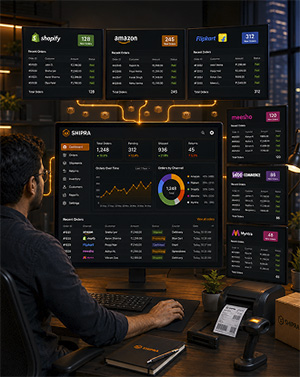
Shipra is a shipping platform for online sellers in India. The short version — it takes the manual work out of getting orders dispatched. You connect your store (Shopify, Amazon, Flipkart, WooCommerce, whatever you’re selling on), and from that point orders start coming in automatically. Shipra looks at each order, picks a courier, generates the label, and pings the customer with a tracking link. Your team packs the box. That’s their job. Everything around that runs without anyone having to touch it.
Pretty simple. Go to shipra.org, click Sign Up, and fill in your business name, email, and phone number. That’s about it for the form itself — takes 2 minutes max. After that you land on your dashboard. First thing you’ll want to do is connect your store and add whichever couriers you’re already working with. Most people have everything set up and their first order syncing on the same day they sign up.
Connect your store — takes about 10 to 15 minutes — and orders start coming in on their own. Each order gets a courier assigned based on rate and pin code availability. Labels are generated and ready to print from the dashboard. Customers get tracking without you sending anything. What makes it specific to India is the COD handling, the return flows, and the fact that it works with Indian couriers and Indian marketplaces properly. A lot of international tools don’t do that well. This one’s built around how Indian ecommerce actually works.
On the store side — Shopify, WooCommerce, Amazon, Flipkart, Meesho, Magento, BigCommerce, and others. Couriers include Delhivery, BlueDart, Ecom Express, DTDC, XpressBees, and more. Full list is at shipra.org on the integrations page. If what you’re using isn’t on the list, contact the team. They keep adding new ones and can tell you if yours is already being worked on or when it might be available.
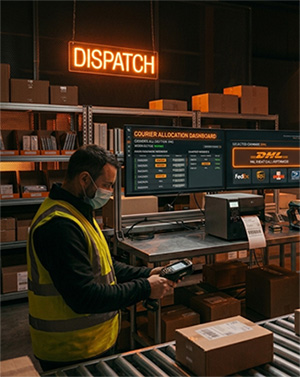
When an order comes in, Shipra checks all your connected couriers at once — not one by one. It looks at three things: what each courier is charging for that specific order, how long they’re estimating for delivery, and whether they even cover that pin code. Best fit gets assigned, automatically. No manual comparison needed. You can also set your own rules on top of this — always use a certain courier for specific cities, or skip a courier for high-value orders — and Shipra applies them without you having to think about it each time.
Yes. One dashboard, all couriers, all shipments. You’re not logging into Delhivery’s site for some orders and XpressBees for others. Everything shows up in one place and you can filter by status, courier, date range, or which platform the order came from. Customers get tracking links sent to them automatically too, which means your support team stops getting buried under ‘where is my order’ messages every afternoon.
Yes, and this is one of the bigger time-savers on the platform. COD shipments are tracked separately and Shipra pulls in the collection data from each courier automatically. You can see what’s been collected, what’s pending, and where numbers don’t add up — without downloading remittance reports from five different courier portals and matching them in a spreadsheet. If your business runs on high COD volumes, you already know how much time this takes to do manually every week. Shipra handles it for you.
Works for both. There’s no minimum shipment volume to get started and the pricing isn’t structured only for large sellers. If you’re at 30 to 50 orders a day and the manual process is already eating into your morning, it’s worth it. And you won’t need to switch later — the platform scales as your volume goes up. A lot of sellers who signed up when they were doing small numbers are now handling thousands of orders a day on the same Shipra account without any issues.
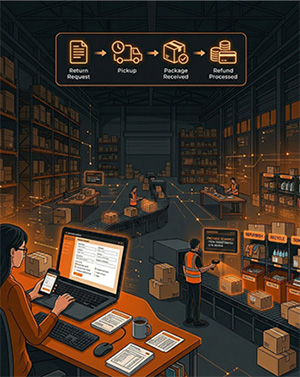
Return request comes in, Shipra creates a reverse shipment and books the pickup with the courier. From there you can track it on the dashboard just like a forward shipment — no need to call the courier or check their website separately. When the package lands back at your warehouse, you mark it received and handle the refund from the same screen. The whole thing stays in one place. No separate system, no back-and-forth with the courier, no guessing where the package is.
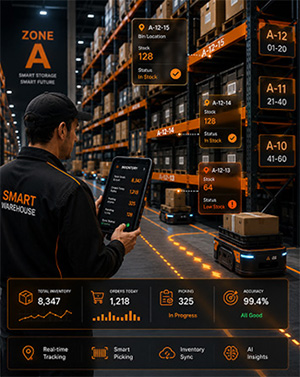
Most platforms here are basically courier allocation tools and not much else. Shipra does that too, but it also handles warehouse management, inventory tracking, COD reconciliation, returns, and multi-channel order syncing — all under one account. You’re not paying for four different subscriptions and trying to get them to talk to each other. And it’s built for how Indian ecommerce actually runs — high COD percentages, frequent returns, multiple couriers, multiple marketplaces. International tools aren’t built for that.